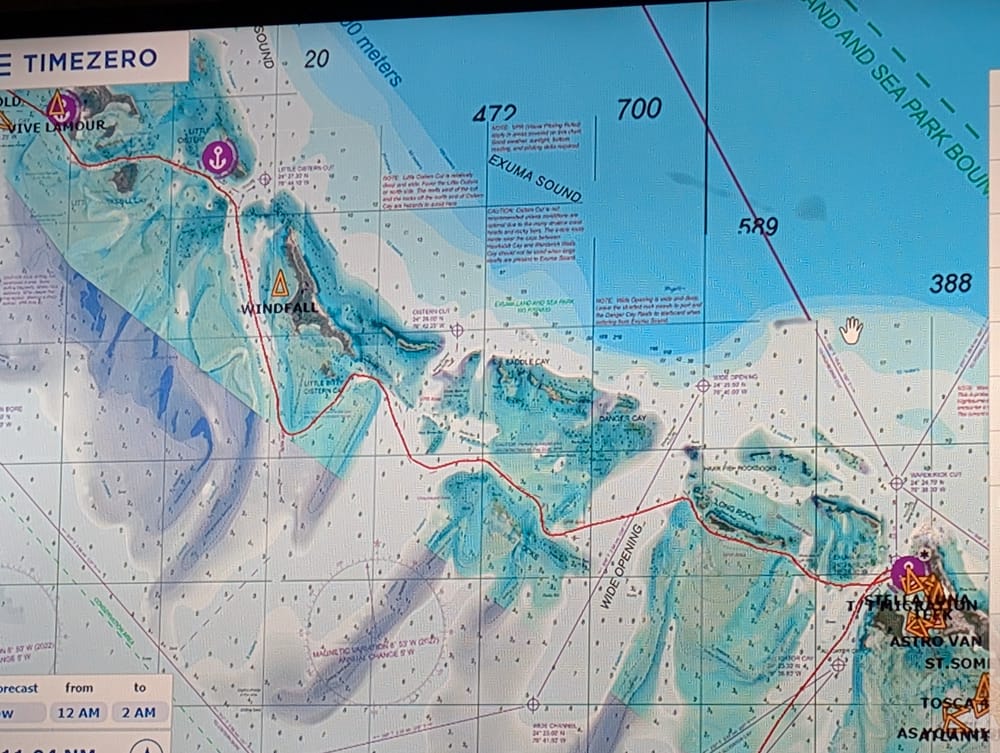
I've been using TimeZero as my primary navigation software for a while now, across a PC, an iPad, and synced to Furuno chartplotters. It's the best integrated marine navigation platform I've found — and it has some frustrating gaps that keep it from being perfect.
Here's the honest breakdown.
What TimeZero Is
TimeZero makes navigation software for recreational and professional mariners. The ecosystem includes:
- TZ Navigator — the PC/laptop application (Windows only). Full chart plotting, route planning, weather, radar overlay.
- TZ iBoat — the iPad/iPhone app. Charts, AIS, basic navigation.
- TZ Cloud — syncs waypoints, routes, and tracks across all your devices.
- Furuno NavNet integration — connects directly to Furuno MFDs (TZT2, TZT3, TZtouchXL) via Ethernet.
The whole point is that everything stays in sync. Plan a route on your laptop, it shows up on your iPad and your chartplotter. Drop a waypoint on the chartplotter, it syncs back to the laptop. This is what sets TimeZero apart from everything else.
What I Love
Furuno Chartplotter Sync
This is the killer feature. If you have Furuno NavNet hardware (and you should — Furuno makes the best commercial-grade electronics for recreational boats), TimeZero talks to it natively over Ethernet. Not NMEA 0183, not a janky WiFi bridge — a direct network connection.
Routes, waypoints, tracks, radar overlay — all shared between your laptop and your chartplotter in real time. No other navigation software does this as seamlessly.
TZ iBoat Integration
The iPad app syncs with TZ Navigator via TZ Cloud. Plan a passage on your laptop at the nav station, walk up to the cockpit with your iPad, and everything is there. Mark a waypoint on the iPad, it shows up on the laptop and the chartplotter next time you sync.
For cockpit use, the iPad is often more convenient than going below to the nav station. Having your full route plan on a tablet you can hold is genuinely useful.
Weather Routing (Paid Module)
The weather routing module on TZ Navigator is excellent. It downloads GRIB data, factors in your boat's polar diagram (or power boat performance profile), and calculates optimal departure times and routes based on forecasted conditions.
It's not PredictWind-level ML routing, but it's integrated directly into your chart planning workflow. You don't have to switch apps, export routes, or manually reconcile different tools. Plan the route, check the weather, optimize the timing — all in one window.
Weather Overlay (Paid Module)
Live weather overlay on the chart is well-implemented. Wind, waves, pressure, precipitation — all rendered as color overlays or particle animations directly on your navigation chart. You can cache forecasts for offline use, which matters offshore.
The Integration Factor
This is really the whole point. Every other approach I've tried involves stitching together multiple apps: Navionics for charts, PredictWind for weather routing, a separate AIS app, a separate anchor alarm, separate radar display. TimeZero puts it all in one platform with one interface. The reduction in task-switching and data reconciliation is worth the price of admission alone.
What I Don't Love
Windows Only (PC Version)
TZ Navigator only runs on Windows. If you're a Mac user — and a lot of boaters are — you're either running Boot Camp, a VM, or buying a dedicated Windows laptop for the nav station. It's 2026. This shouldn't be a limitation.
The iPad app helps bridge the gap, but it doesn't have weather routing or the full feature set of the PC version. So you still need that Windows machine for passage planning.
Chart Selection
This is my biggest ongoing frustration. Garmin acquired Navionics, and chart availability has gotten complicated. TimeZero supports C-MAP and Navionics (via Datacore), but the options feel limited compared to what's available on other platforms.
In some regions the chart quality and coverage is excellent. In others, you're stuck with charts that feel outdated or lack detail. If you're cruising in well-charted waters (US, Europe, popular Caribbean), it's fine. If you're going off the beaten path, check chart availability for your area before committing.
Weather Model Limitations
The paid weather module uses GFS as the base model, with high-resolution regional models available as add-ons. But it doesn't include ECMWF — which is widely considered the best global weather model for marine forecasting.
The Copernicus wave model (which is forced by ECMWF winds) is available, so you get some ECMWF-derived data for wave forecasts. But for wind and pressure forecasting, you're limited to GFS and regional models. If you're doing serious offshore passages, you'll probably still want PredictWind or a dedicated GRIB viewer with ECMWF access alongside TimeZero.
Price
TZ Navigator with charts runs around $650. The weather routing module is additional. The weather overlay module is additional. Chart subscriptions are ongoing. The iPad app has its own in-app subscriptions for premium features.
It adds up. For a full setup with all the modules, you're looking at $800-1000+ and then ongoing chart/weather subscriptions. It's not unreasonable for what you get, but it's not cheap.
Who Should Use TimeZero
Buy it if:
- You have Furuno chartplotters and want seamless laptop/tablet integration
- You want one platform instead of five separate apps
- You do passage planning and want integrated weather routing
- You value workflow integration over having the absolute best of each individual feature
Skip it if:
- You're a Mac-only household and don't want a Windows machine on the boat
- You need ECMWF weather models for offshore routing
- You're on a tight budget and free apps (Navionics, OpenCPN) cover your needs
- You don't have Furuno hardware — the integration advantage disappears
The Bottom Line
TimeZero is the best integrated navigation platform I've used. The Furuno sync, the iPad integration, the weather routing, and the unified workflow genuinely make passage planning and navigation easier. Nothing else combines all of these into a single ecosystem this well.
But the Windows-only limitation, the chart selection issues, and the lack of ECMWF weather models keep it from being the slam-dunk recommendation it should be. If those gaps don't affect you, TimeZero is excellent. If they do, you'll end up supplementing it with other tools anyway.
For most cruisers with Furuno electronics, TimeZero is worth the investment. Just go in knowing the limitations.